



Ask five Unreal Engine developers what Nanite is and you will get five wrong answers. Someone will tell you it is an LOD system. Someone else will say it is a way to render a trillion triangles. Both descriptions miss the mechanism. Nanite is a visibility-buffer renderer with a GPU-resident cluster DAG, a compute-shader software rasterizer for sub-pixel triangles, and a deferred material pass that shades once per visible pixel. That composition is the whole trick. If you want to understand unreal nanite how it works, you have to take each of those pieces apart and see why they only make sense together.
This is the mental model I wish someone had handed me before I spent a week staring at stat GPU output wondering why my forest scene had gotten slower after I Naniteified it. Nanite is not a free lunch. It is a fixed per-frame tax that buys you O(1) scaling in geometric density, and there are entire categories of scene where that trade does not pay off. Let’s build up to why.
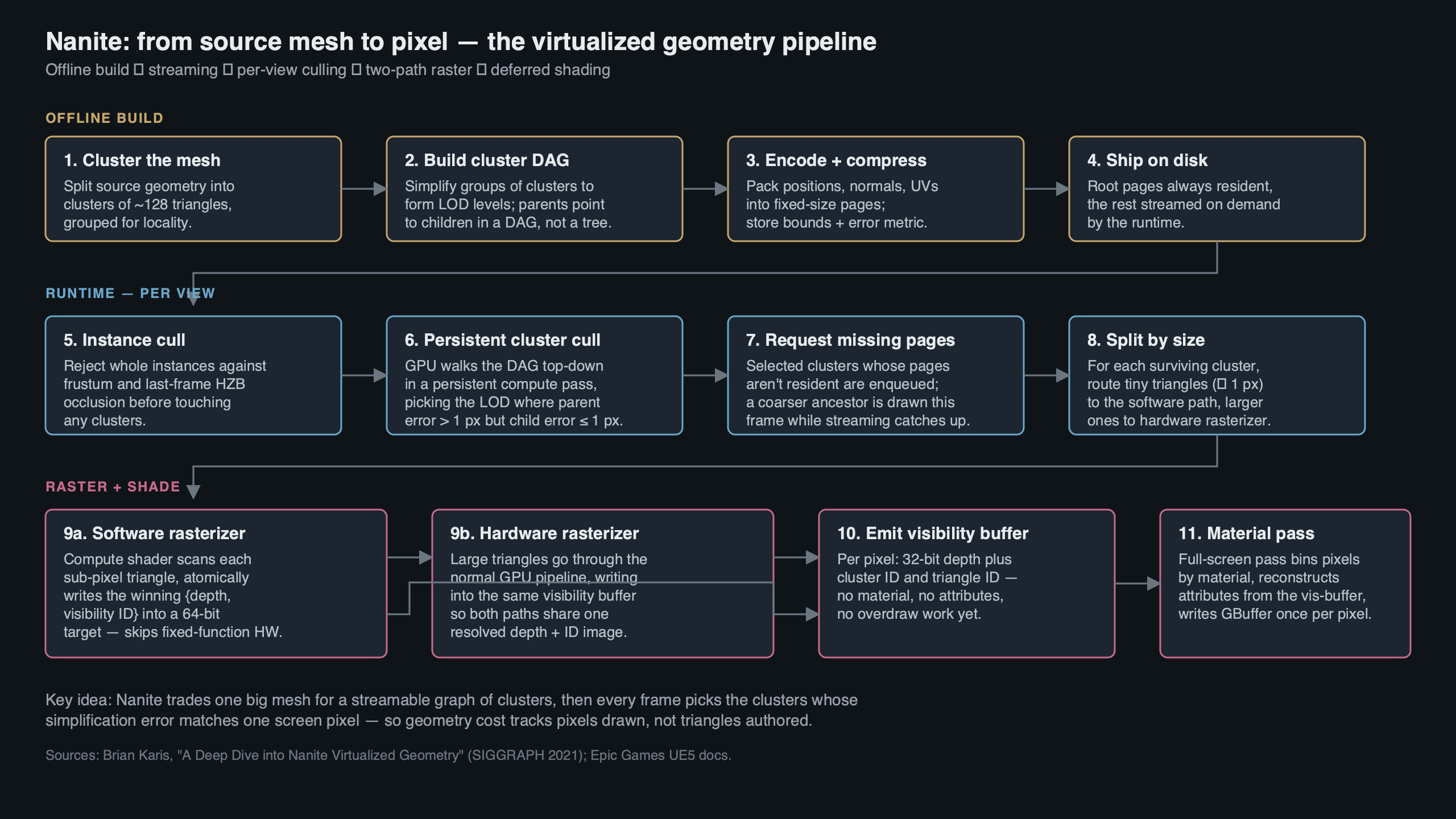
The diagram above lays out the four stages of a Nanite frame in the order they happen on the GPU: cluster culling against the DAG, software-or-hardware rasterization into the visibility buffer, material resolve, then classic deferred shading on top. Everything in this article hangs off that pipeline, and every paragraph below is explaining one of those four boxes.
Nanite Is a Visibility-Buffer Renderer, Not a Geometry System
The single most important fact about Nanite is that it does not write into a GBuffer during rasterization. It writes into a 64-bit-per-pixel visibility buffer. Per Brian Karis’s SIGGRAPH 2021 talk, each pixel stores 30 bits of depth, 27 bits of visible cluster index, and 7 bits of triangle index, all committed with a 64-bit integer atomic max. That is the output of the whole geometry pass — not albedo, not normals, not roughness. Just “which triangle of which cluster is visible here.”
Why does that matter? Because every other design decision in Nanite is downstream of this choice. Materials are deferred, which is why overdraw stops mattering. The rasterizer can run in a compute shader, because it only has to write an integer pair into a buffer — no ROP, no color blending, no multi-render-target dance. And the cluster hierarchy can be traversed on the GPU, because the output format fits the atomic primitive the GPU already exposes. Every time someone calls Nanite “magic,” they are describing an emergent property of this one format decision.
This is also why Nanite’s hardware requirement is 64-bit integer atomics. On D3D12 that means Shader Model 6.6 with int64 atomic support; on Vulkan it means VK_KHR_shader_atomic_int64. That rules out pre-Turing NVIDIA (the GTX 10-series can forget it) and pre-RDNA2 AMD. If someone tells you their GPU “doesn’t support Nanite,” this is almost always the underlying reason — the atomic primitive is not there.
The Cluster-Group DAG: Why It’s a DAG and Not a Tree
Nanite partitions every mesh into clusters of 128 triangles. Clusters are grouped into cluster-groups of 8–32 clusters, and each group is simplified as a unit to produce the next LOD level. The hierarchy across LODs is not a tree — it is a directed acyclic graph, because adjacent groups at a given LOD share boundary vertices at the next LOD up. That sharing is the whole point.
If the hierarchy were a tree, every cluster at LOD N would have exactly one parent at LOD N-1, and the boundaries between siblings would become visible seams whenever the runtime picked different LODs for neighboring regions. A DAG dodges that by merging parents: the simplified version of group A and the simplified version of group B are the same output cluster along their shared edge. No matter which LOD each side ends up at, the boundary vertices match by construction.
This is the piece most third-party explainers gloss over. Calling it “a hierarchy” is not enough. The hierarchy has to be a DAG, it has to merge at group boundaries, and it has to enforce a monotonicity invariant: parent_group.error >= max(child_group.error). Without that invariant, the next mechanism — the locally-independent cut — does not work.
The Locally-Independent Cut: Why LOD Selection Is Embarrassingly Parallel
Here is the expression Karis’s slides use for the runtime cut:
// Render this cluster-group if its own error is acceptable
// AND its parent's error was not.
bool render = (parent_error > threshold) && (cluster_error <= threshold);
Every group evaluates that expression using only local data — its own screen-space-projected error, and a cached parent error. No sibling communication. No global sort. No dependency on another group’s decision. That is what makes the cut embarrassingly parallel: you dispatch one thread per group in a compute shader and the answer drops out.
The monotonicity invariant from the previous section is what makes this safe. Because parent error is guaranteed greater than or equal to any child error, exactly one ancestor-descendant chain per subtree satisfies the inequality. You get exactly one group per chain. Crack-free, by construction, every frame.
The error metric itself is a bounding sphere plus a scalar: for each group, Nanite stores the sphere that encloses all simplification error and the maximum deviation in world units. At runtime the sphere is projected into screen space and compared against the r.Nanite.MaxPixelsPerEdge threshold (default 1.0). When the projected error is sub-pixel, the group is “good enough” and the traversal stops descending. That is what “render at pixel-scale detail” actually means — not that every triangle is one pixel, but that any error below one pixel is indistinguishable from the right answer.
The Software Rasterizer and the 2×2 Quad Problem
Hardware rasterizers on every desktop GPU shipped in the last fifteen years process pixels in 2×2 quads, not individual pixels. The reason is derivative calculation for mipmap selection — you need adjacent pixels’ UV values to compute ddx/ddy, so the pixel shader runs on the full quad even when only one of the four lanes is actually covered. For a triangle that covers one pixel, the hardware does four lanes of work to produce one useful sample. That is a 75% waste, and it scales linearly with how many sub-pixel triangles you throw at the GPU.
This is the specific pathology Nanite’s software rasterizer exists to solve. When a cluster’s triangles are small — Nanite’s cutoff is roughly one pixel per edge — the frame dispatches a compute-shader rasterizer instead of the hardware pipeline. The compute path walks triangle edges, computes coverage at integer pixel centers, and does a 64-bit atomic max into the visibility buffer. No quads, no derivatives, no wasted lanes. For clusters whose triangles are larger than the threshold, Nanite falls back to the hardware rasterizer because at that size the quad cost amortizes fine and the fixed-function silicon wins.
The crossover point is the whole reason the software path exists. Below the threshold, the compute shader is faster than the silicon — reports from engine developers and from Karis’s talk put the software path at 3–4x the throughput of the hardware path for the smallest triangles. Above the threshold, silicon wins and Nanite knows it. If you want to see this in your own profile, enable r.Nanite.ShowStats 1 and watch the HW Triangles vs SW Triangles counters as you dolly the camera. They cross over exactly where you would expect.
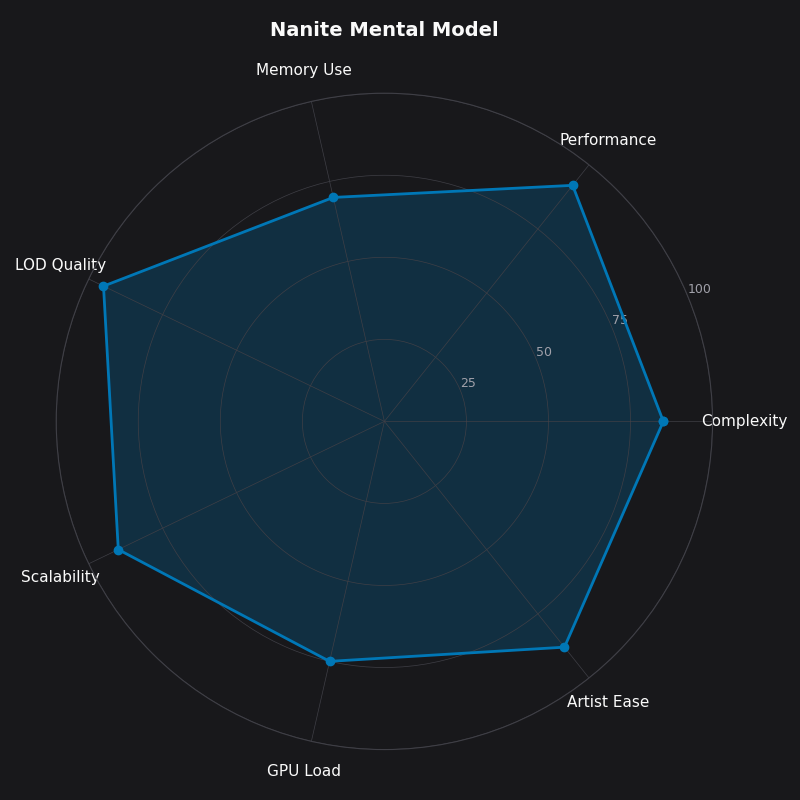
The radar chart above is how I internalize the shape of Nanite’s trade-space. Geometric density and shading-cost stability both score high, because those are the properties the visibility buffer and software rasterizer were designed to deliver. Dynamic geometry and baseline frame cost both score low, because those are the axes where Nanite pays a tax to get everything else. If you look at a scene and the shape of its requirements does not match the shape of that chart, Nanite is probably not the right answer for it.
Streaming as Virtual Memory for Geometry
Nanite’s streaming system is virtual memory — not “like” virtual memory, literally virtual memory. Meshes are stored on disk as 128KB pages. Each mesh has a small root page that is always resident in GPU memory; the rest of its cluster hierarchy streams in on demand, keyed by which groups the current frame’s cut actually touched. Unreferenced pages get evicted under memory pressure. The eviction granularity and the residency guarantee come straight from the Karis 2021 slides and Epic’s Nanite documentation, and the page size has stayed at 128KB through UE 5.5.
The practical effect is that a scene with 500 million source triangles needs almost none of them in VRAM. The cut picks one group per subtree per frame, the streamer faults in any pages that group’s clusters live on, and the rest of the hierarchy stays on disk. If you want to see this breathing in real time, enable NaniteStats in the console and watch the Streaming Pool Used bar as you fly through a level. The pool is capacity-bounded (default 512MB, tunable via r.Nanite.Streaming.StreamingPoolSize), and when it fills, you get evictions, and if evictions outrun the streamer, you get pop-in on the next frame’s cut.
This is the piece people keep missing when they ask why Nanite “just works” with 10GB source assets. It does not load 10GB. It loads the pages the current frame’s visible cut needs, plus the root pages of every Nanite mesh in the level. Everything else is cold storage.
Deferred Materials and Why Overdraw Collapses to 1.0
Classic deferred rendering pays overdraw cost once per covered pixel per draw call — if ten opaque triangles land on the same pixel during the GBuffer pass, ten pixel shaders run, nine of them get overwritten. Nanite inverts the sequence. The visibility buffer pass writes a single integer per pixel using an atomic max keyed on depth, so only the closest triangle survives. Then materials execute, and they execute exactly once per visible pixel, because the visibility buffer has already resolved which triangle wins.
Per-pixel overdraw in the material pass collapses to 1.0. Geometric complexity stops being a shading-cost variable. You can stack a hundred overlapping high-poly rocks and the material pass cost is the same as if there were one rock — because the buffer only holds one winner per pixel, and the material pass only visits surviving pixels. This is the keystone property of Nanite, and it is the one competitors routinely skip when they talk about it.
The trade is that materials run in screen space, once the visibility buffer is resolved, from a GPU-resident Nanite Material Table. That table is bounded. A project that shoves thousands of unique materials into Nanite meshes will hit the binning cost before it hits the shading cost, and the r.Nanite.ShowStats output starts showing a climbing Material Resolve time. On a disciplined project with a few hundred materials, the resolve pass is near-free.
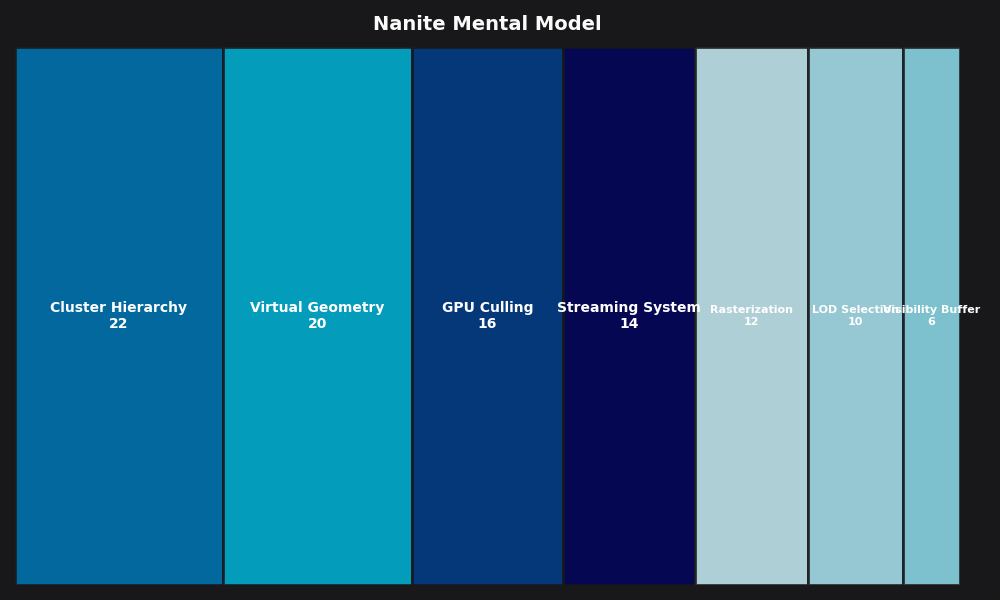
The breakdown above is my working budget for a Nanite frame on current-gen consoles: cluster culling and instance culling account for roughly the first millisecond, the rasterizer pass (software + hardware combined) lands around two, material resolve is under one, and the rest of the classic deferred lighting/post stack fills out the frame. The shape of that breakdown is why Nanite has a fixed floor no matter how simple the scene is.
The Fixed Tax: When Nanite Makes Your Game Slower
Epic’s own engineering blog on Fortnite Chapter 4 puts the Nanite baseline at roughly 2.5–4ms on current-gen consoles — and that cost is there whether you are looking at a cathedral or an empty field. It is the cost of running the persistent cluster culling pass, the visibility buffer resolve, and the material binning pipeline. Classic static-mesh rendering has no equivalent fixed cost: a simple scene renders in microseconds because the hardware pipeline has no per-frame GPU-driven bookkeeping to do.
This is the conversation most Nanite tutorials do not have. Nanite is slower than classic rendering for scenes that do not need it. If your game is a mobile title with aggressive art budgets, a stylized indie with low-poly meshes, or a multiplayer FPS with flat environments and a strict 2ms render-thread ceiling, forcing Nanite on every mesh is a regression. You pay 3ms of tax for the privilege of O(1) geometric scaling in a scene that does not have any geometry to scale.
The break-even happens when your scene has enough sub-pixel triangles that the hardware rasterizer would have been bottlenecked on quad overdraw, or enough overdrawing geometric complexity that the deferred material pass savings overtake the fixed culling tax. For the projects I have worked on, that has meant “environments with Megascans-class source assets and dense natural geometry.” Everything else was Nanite-neutral at best.
The decision rule I use: disable Nanite on meshes under ~10k source triangles, on anything with animated per-vertex motion the system cannot amortize (more on that below), and on any project whose target hardware does not meet the 64-bit atomics requirement. That is a three-line decision tree and it has saved frame budget on every UE5 project I have seen it applied to.
What Still Breaks: Foliage, Skeletal Meshes, WPO, and the VSM Coupling
Nanite’s limitations are not arbitrary. They are direct consequences of the cluster-amortization model. When per-instance triangle counts are low — individual grass blades, scattered pebbles — the fixed per-cluster overhead eats any theoretical benefit. The Nanite Foliage pipeline that shipped in UE 5.3 and was expanded through 5.5 addresses this by batching foliage instances into shared clusters, but the underlying constraint is the same: clusters need enough triangles to amortize their bookkeeping cost.
Skeletal meshes were a harder problem because cluster data was static on the GPU. Skinned deformation invalidates the cluster bounds used for the error metric and culling. Support landed experimentally in UE 5.5 with CPU-side skinning feeding the Nanite path, but it remains a constrained feature — expect lower throughput than static Nanite meshes and watch the GPU traces carefully if you turn it on for hero characters.
World Position Offset (WPO) has the same failure mode. WPO displaces vertices in the vertex shader, but Nanite’s cluster culling uses precomputed bounds that do not know about runtime WPO. The fix is to set a conservative WPO disable distance per material so clusters far from the camera skip the WPO evaluation entirely; the console variable is r.Nanite.WPODistanceDisableThreshold, and the right value for your project is the minimum distance at which the WPO amplitude is less than a pixel on screen.
The Virtual Shadow Maps dependency is the one nobody warns you about. Nanite’s shadow pass reuses the same GPU cluster culling plumbing VSMs use. If you disable VSMs and fall back to classic cascaded shadow maps while leaving Nanite on, you force the engine to rasterize Nanite clusters through the classic shadow path, and the cost multiplies across every cascade. Epic’s Fortnite Chapter 4 VSM blog is explicit about this: VSMs are not optional alongside Nanite at scale, they are the shadow path Nanite was designed to feed. Plan your shadow pipeline accordingly.
The mental model, in one paragraph
Nanite is a visibility-buffer renderer that uses a DAG of 128-triangle clusters with a monotone error metric to pick a locally-independent cut on the GPU, rasterizes sub-pixel triangles through a compute-shader rasterizer that avoids the hardware 2×2 quad penalty, streams cluster pages through 128KB pages of geometry virtual memory, and shades once per visible pixel through a deferred material pass. It costs about 3ms of fixed per-frame tax on current-gen consoles regardless of scene complexity, so you use it when your scene is geometrically dense enough that O(1) scaling is worth the tax, and you turn it off when it isn’t. That is the whole system. Every other question about Nanite reduces to one of those pieces.
- Epic Games — Nanite Virtualized Geometry documentation: the canonical reference for the streaming pool, console variables, and feature limitations discussed above.
- Brian Karis, “Nanite: A Deep Dive” — SIGGRAPH 2021 Advances in Real-Time Rendering (PDF): the primary source for the visibility buffer format, the DAG/monotonicity invariant, the software rasterizer, and the 64-bit atomic write path.
- Epic Games — “Bringing Nanite to Fortnite Battle Royale in Chapter 4”: Graham Wihlidal’s engineering writeup of Nanite’s performance characteristics at production scale, including the baseline frame cost figures.
- Epic Games — “Virtual Shadow Maps in Fortnite Battle Royale Chapter 4”: Lauritzen and Olsson on why VSM is the shadow path Nanite expects and what happens when it isn’t.
- Brian Karis, “Journey to Nanite” — HPG 2022 keynote (PDF): the decision-history version of the SIGGRAPH talk, useful for understanding why each piece of Nanite landed where it did.