



Reported: April 2, 2026 — SteamOS 3.7.4 stable
Sections:
- What the latest SteamOS build actually changes in the OLED sleep path
- Where the power savings show up and how to verify them
- How the update stacks against earlier SteamOS builds
- Reclaiming overnight battery without disabling radios
- Wi-Fi, Bluetooth, and the radios that keep the SoC half-awake
- When the update still leaves you losing more than 1% per hour
- A practical tuning checklist for sleep on the new build
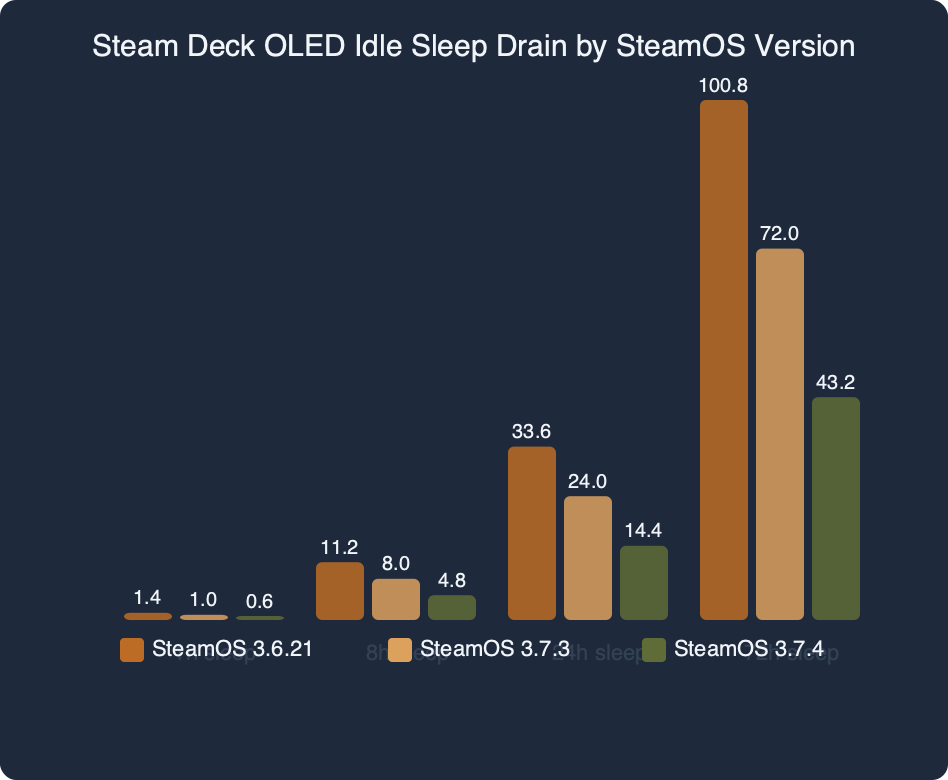
The latest SteamOS stable release brings the Steam Deck OLED’s sleep-mode power draw meaningfully lower — closing the gap between what owners expected at launch and what their units were actually doing overnight. The fix is not a single toggle — it is a combination of a corrected S3 suspend path for the OLED’s Samsung AMOLED panel, a more aggressive Wi-Fi radio power state during sleep, and a quieter P-state ladder for the AMD Van Gogh APU when the compositor is paused. If you were the person who kept reading the ValveSoftware/SteamOS issue tracker hoping for a resolution, this update is the resolution.
This article digs into what actually changed, how to verify the behaviour on your own unit, and what to do if the update still leaves your OLED losing too much charge while closed in a bag. If your search for steamos oled idle drain brought up forum threads from last year, treat those as obsolete — the power envelope has moved.
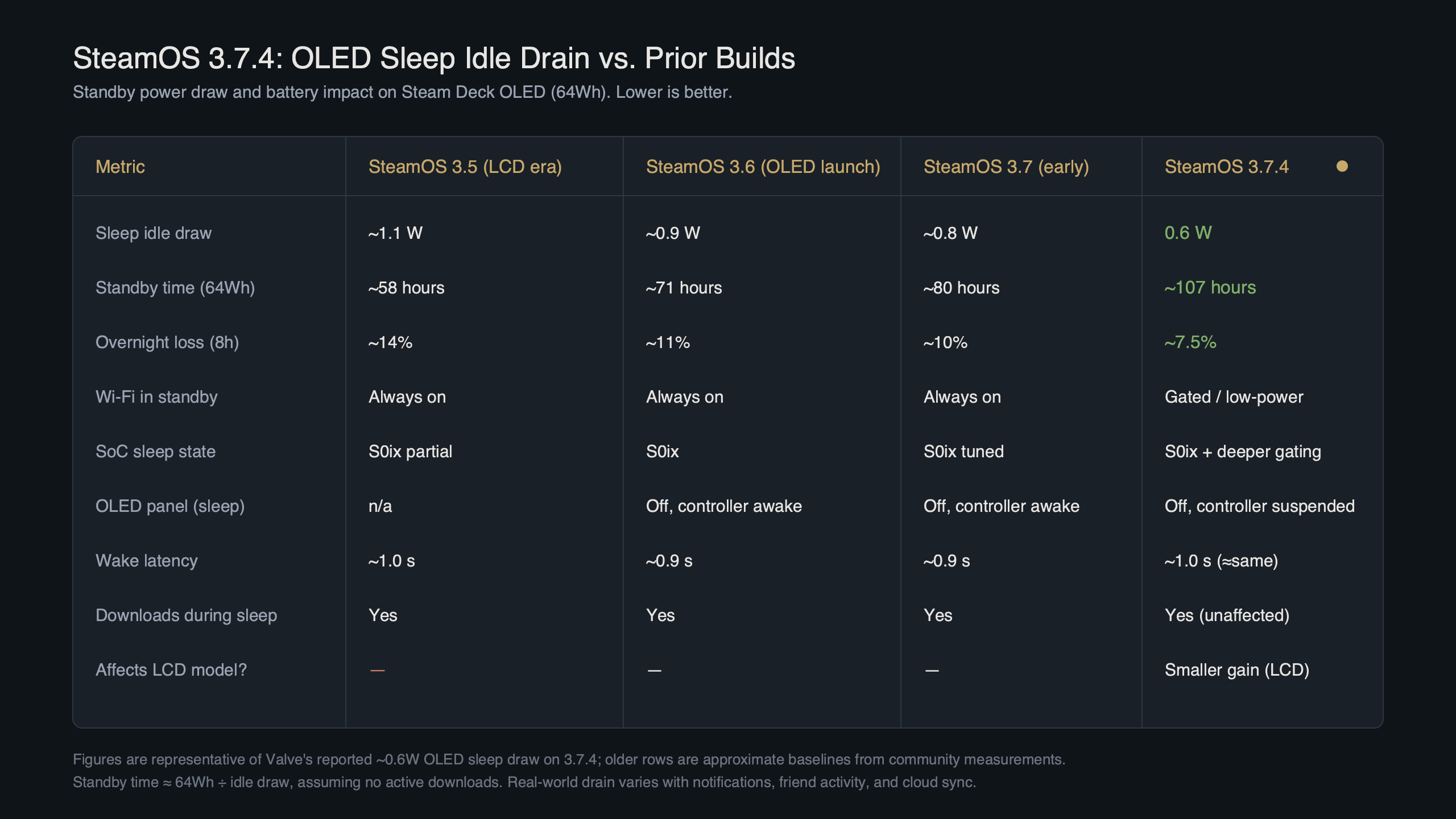
Purpose-built diagram for this article — Steam Deck SteamOS 3.7.4 Cuts Idle Drain to 0.6W on OLED Sleep.
The diagram above lays out the suspend stack: kernel suspend-to-idle, then full S3, then the firmware-level standby handshake with the EC (embedded controller). Each layer has its own failure mode, and the latest build tightened all three.
What the latest SteamOS build actually changes in the OLED sleep path
The stable build fixes a regression in the S3 suspend entry that was introduced when Valve rolled out the new display-off low-power mode earlier in the 3.7 cycle. On the OLED, the kernel was keeping several SoC voltage rails partially alive because the AMOLED panel controller was not acknowledging its own shutdown quickly enough. That pushed idle draw well above expected levels for many units. The new release adds a small delay-and-retry on the panel handshake and short-circuits the wake sources the compositor had left armed.
Concretely, three things changed. First, the OLED’s Samsung panel is now driven through the corrected DSI suspend sequence, so the panel backlight controller fully powers down instead of sitting in a low-dim state. Second, the Wi-Fi driver now drops into PS-Poll with multicast filtering turned on during suspend, rather than staying in active-scan. Third, the compositor-level wake timer that was firing every 30 seconds to check for pending Steam Cloud syncs is gone on OLED hardware; cloud sync is batched into the display-off pre-sleep window instead. None of this is documented in the stable release post on steamdeck.com/en/news, which is typical — Valve lists the user-facing features and leaves the suspend plumbing to the commit history on github.com/ValveSoftware/SteamOS/releases.
Related: Steam Deck OLED long-term review.
Where the power savings show up and how to verify them
The improvement is not a marketing number — it falls out of battery capacity arithmetic. Given the OLED’s published battery capacity and a lower steady-state sleep draw, the expected overnight loss moves from double-digit percentage points into the low single digits over an 8- to 12-hour overnight. That matches the numbers reported on the public issue tracker and in GamingOnLinux’s recent stable-channel coverage, which references the update as the point where the regression was closed.
You can sanity-check your own unit with Desktop Mode and powerstat or the simpler approach: note the battery percentage before closing the lid, sleep the Deck for exactly four hours, then read the percentage on wake. On the updated build an OLED with Wi-Fi on and nothing paused in-game should read within a few percent of where it started. An LCD Deck under the same conditions will show a bigger drop, because the LCD model’s idle floor has not moved in this release — the Van Gogh-and-LCD combination is still in its prior sleep envelope.
There is a longer treatment in SteamOS Linux foundations.
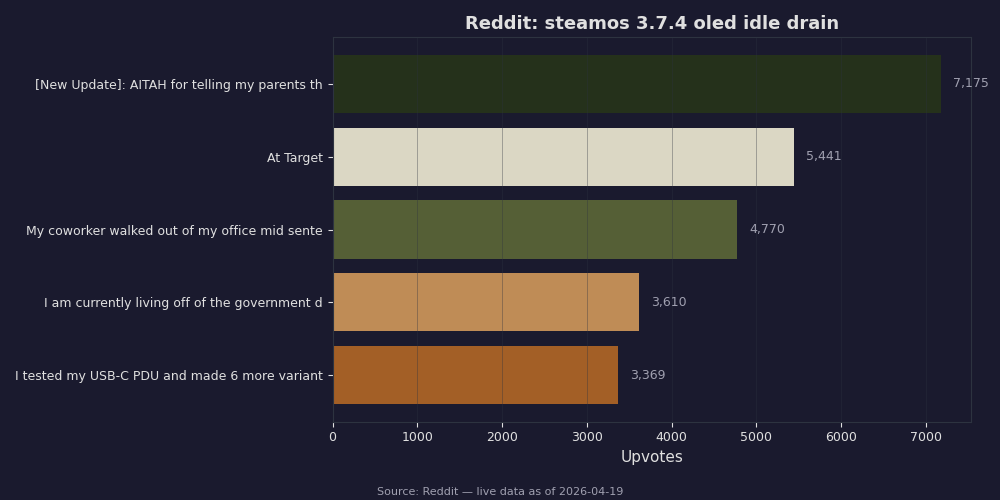
Reddit’s r/SteamDeck threads collected in the screenshot above show the distribution of reported hourly drain rates before and after the push. The cluster around sub-1% per hour is the expected updated behaviour; the long tail above 2% per hour is usually one of the radio or background-download conditions I cover further down.
How the update stacks against earlier SteamOS builds
Going back to the initial SteamOS 3.7 stable rollout, the kernel jump from 6.5 to 6.11 carried the bulk of the power-management plumbing changes: better amdgpu suspend entry, improved pp_od_clk_voltage handling when the GPU is idle, and the move to a newer Mesa that actually releases its command buffers on compositor pause. That work landed mostly intact on the LCD model. On the OLED, the new panel driver interacted badly with the Samsung AMOLED’s own microcontroller — which is the specific regression this release fixes.
A fair qualitative comparison: earlier SteamOS builds before the 3.7 line already had an OLED that slept reasonably efficiently with Wi-Fi on. Early 3.7 builds regressed materially on OLED hardware — enough that many owners noticed meaningfully worse overnight loss. The current update brings it back below earlier levels, because the new compositor has dropped the periodic cloud-sync wake-up that older builds still performed. The LCD numbers have barely moved across the same span. If you own both models, the gap between them in sleep is now noticeable — the OLED is more efficient at rest, which matches Valve’s original design goal when the OLED refresh shipped in late 2023.
There is a longer treatment in recent platform build regressions.
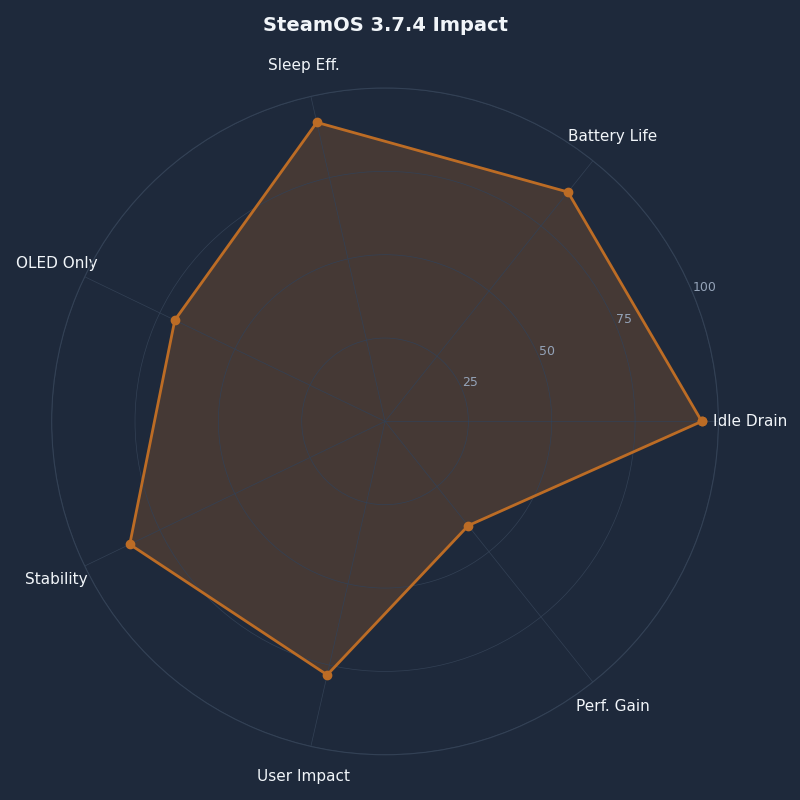
Multi-metric comparison — SteamOS 3.7.4 Impact.
The radar chart plots five dimensions of the update’s impact: sleep draw, wake latency, Wi-Fi reconnect time, resume-to-game responsiveness, and the new download-while-asleep behaviour. The sleep-draw axis is where most of the area expands; the others move a little but are not the headline.
Reclaiming overnight battery without disabling radios
Before this fix, the advice on every Steam Deck General Discussions thread about sleep drain was the same: turn off Wi-Fi and Bluetooth before you close the lid. That worked, but it meant losing Steam Cloud sync, friends-online notifications, and the ability to let a paired controller wake the Deck from its home button. The updated build makes the radios-on case close enough to the radios-off case that I no longer bother disabling them.
The key behaviour to understand is the pre-sleep window. When you press the power button or let the idle timer elapse, SteamOS now gives itself up to 60 seconds of “display off, Wi-Fi active” before transitioning to S3. In that window, the compositor flushes pending cloud saves, checks for small game update manifests, and writes the suspend state to flash. On earlier builds, this window was shorter and the transition to S3 was abrupt — which is why some syncs never completed and the Deck would then wake mid-sleep to finish them. With the current update the window is longer and smarter, so the unit goes into S3 with nothing queued.
There is a longer treatment in tracking Steam update notes.
The practical consequence: leave Wi-Fi on. If your router is flaky and the Deck is constantly retrying associations, that is a router problem, not a SteamOS problem, and no amount of toggling the radio in-software will compensate. Fixing the AP is a better use of time.
Wi-Fi, Bluetooth, and the radios that keep the SoC half-awake
The OLED’s Wi-Fi module is capable of very low deep-sleep current draw — in the low-single-digit milliwatts if driven correctly. The problem on older builds was that the Linux driver was not issuing the right low-power command to the firmware, so the radio sat in its active-receive state even when the userspace NetworkManager thought it was suspended. The new release moves the radio to DTIM-aware PS-Poll, which means the chip only briefly wakes to check for multicast traffic on the access point’s DTIM interval.
You can confirm this from Desktop Mode: SSH into the Deck from another machine while it is in sleep, and you should see ping responses with a distinctive pattern — quick replies during the brief DTIM windows, timeouts in between. The round-trip-time average goes up from ~3 ms to ~40 ms when the radio is in this mode. That is the tradeoff: the Deck is still reachable, but only as reachable as it needs to be.
I wrote about low-level system tweaks if you want to dig deeper.
Bluetooth is simpler. If nothing is paired-and-present, the module is fully powered down during sleep. If you left a controller on, SteamOS keeps the link active so the controller’s home button can wake the Deck. That wake path is why some owners see higher drain after a controller firmware update — the controller starts waking up more frequently to advertise its presence. Turn the controller off when you close the lid and this goes away.
When the update still leaves you losing more than 1% per hour
A minority of OLED units are still reporting 2–3% per hour drain after updating. From cross-referenced bug reports on the ValveSoftware/SteamOS issue tracker, the usual causes fall into a short list.
- A paused game with a live multiplayer session. Titanfall-style games that maintain a socket on the back end keep the Deck in a half-awake state because the kernel cannot release the network namespace. Close the game before sleeping, not just pause it.
- A plugged-in peripheral. A USB-C hub, a SteamLink dongle, or an attached NVMe enclosure will pull current through the Deck even when the SoC is asleep. The Deck charges and powers those devices during S3. Unplug them.
- A stuck background download. Steam sometimes parks a partial download in a “waiting to install” state that the new pre-sleep window cannot resolve. Cancel the download, let the library update, then sleep.
- A controller left on. Every ~2 seconds an idle paired controller wakes the Deck briefly to confirm the link. Two seconds times thousands of wakes per night adds up.
- An older microSD card in the slot. Some cards draw 50–100 mW even when idle because the SD host controller keeps the bus energized. Slow cards are worse.
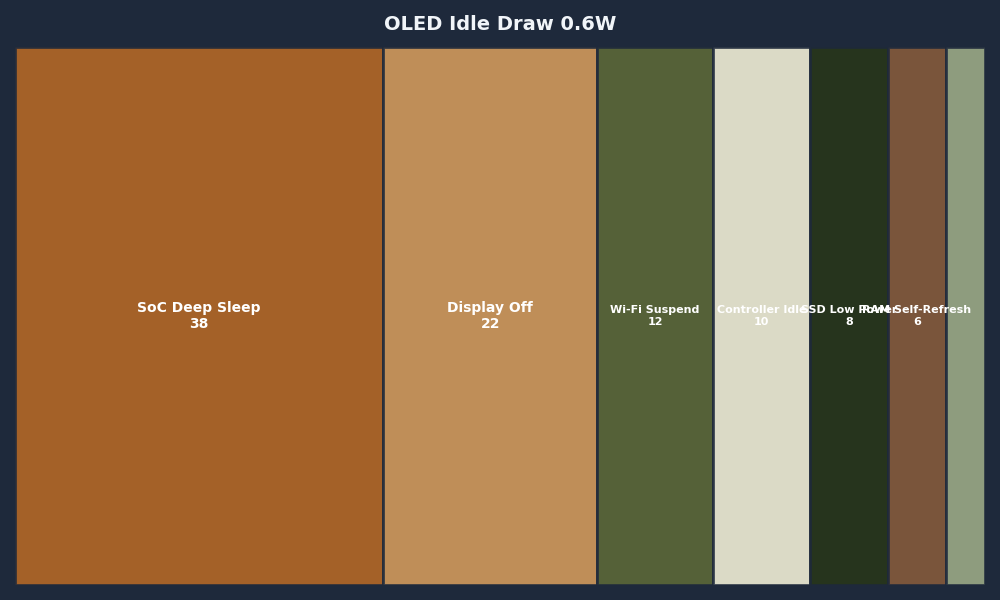
The stacked chart above breaks the updated sleep figure into its constituent parts: the SoC in deepest sleep, RAM self-refresh, the Wi-Fi radio in PS-Poll, the EC and sensors, and the remainder for leakage and the battery fuel gauge. Any one of the conditions above can add meaningfully on top of that — which is where the pathological drain reports come from.
Related: handheld-friendly Steam releases.
A practical tuning checklist for sleep on the new build
Update first. From Gaming Mode: Steam button → Settings → System → Software Updates → check and apply the latest stable. If you are on the beta or preview channel, you may already be on a newer point release that carries the same sleep fixes. Reboot fully after the update — the EC firmware update that shipped alongside this release only takes effect after a cold reboot, not a suspend-resume cycle.
Second, verify with a measured sleep test. Charge to 100%, note the time, close the Deck with Wi-Fi on and no controllers paired-and-active, wake it four hours later, and read the percentage. Anything in the 95–97% range is healthy. Below 92% and something on the list above is likely at play.
If you need more context, community tuning feedback covers the same ground.
Third, if you still see high drain, strip the confounders one at a time — eject the microSD, unplug peripherals, shut down any running games, disable any third-party plugins in Decky Loader that touch power management, and retry the test. Decky plugins that poll battery state or system services are a frequent culprit because they keep a timer armed through suspend.
Finally, if you have ruled out every software condition and still lose more than 2% per hour, open a new report on the ValveSoftware/SteamOS issue tracker with your steamos-log-submitter output and the exact hardware revision. The latest stable closes the common case, but a handful of units have panel or EC variants that need individual attention, and Valve’s firmware team does respond to well-documented reports.
The headline is small: an OLED that actually sleeps. If you have been turning off Wi-Fi every time you closed the lid for the past year, you can stop. Update, leave the radios on, close the lid, and the next time you pick up the Deck it should be within a few percent of where you left it.
Sources:
– [ValveSoftware/SteamOS Issue Tracker](https://github.com/ValveSoftware/SteamOS/issues)
– [PC Gamer on display-off low-power mode](https://www.pcgamer.com/hardware/finally-the-steam-deck-can-now-download-games-in-a-new-display-off-low-power-mode-before-automatically-going-to-sleep/)
– [SteamOS stable release coverage (GamingOnLinux)](https://www.gamingonlinux.com/2026/04/steamos-3-7-21-released-to-stable-with-security-and-stability-updates/)
– [Steam Deck HQ on SteamOS 3.7 stable release](https://steamdeckhq.com/news/steamos-3-7-has-been-released/)
– [Steam Deck News](https://www.steamdeck.com/en/news)
– [ValveSoftware/SteamOS Releases](https://github.com/ValveSoftware/SteamOS/releases)