

Introduction: The Era of Uncompromised Mobility
The landscape of PC Gaming has undergone a seismic shift over the last decade. Gone are the days when “gaming laptop” was a contradictory term, synonymous with overheating bricks that offered a fraction of desktop performance at double the price. Today, we stand in a golden age of Gaming Hardware, where the line between a high-end desktop and a portable rig has blurred significantly. As Gaming Culture evolves, demanding more flexibility without sacrificing fidelity, manufacturers have responded with engineering marvels that balance thermal dynamics, power efficiency, and raw computational speed.
Modern gaming laptops are no longer just about playing the latest AAA Games; they are versatile powerhouses capable of Game Development in Unity or Unreal Engine, streaming via Twitch, and handling complex creative workflows. With the rapid advancement of silicon from giants like NVIDIA, AMD, and Intel, combined with operating system optimizations that improve resource scheduling and security, the portable form factor has become the primary choice for millions of gamers. Whether you are into Competitive Gaming, exploring vast worlds in RPG Games, or grinding rank in Valorant, understanding the technical nuances of these machines is essential. This article explores the intricate ecosystem of modern gaming laptops, from display technology to kernel-level software optimizations.
Section 1: The Silicon Heart – CPU, GPU, and Architecture
At the core of every gaming laptop lies the delicate balance between the Central Processing Unit (CPU) and the Graphics Processing Unit (GPU). Understanding the interplay between these components is crucial for anyone following Gaming News or looking to invest in new hardware.
The GPU Power Struggle: TGP Matters
In the desktop world, a specific model of a Graphics Card usually performs within a predictable margin of error. In laptops, however, the Total Graphics Power (TGP) is the defining metric. An NVIDIA GeForce RTX 4080 Laptop GPU running at 100W will perform significantly differently than the same chip allowed to draw 175W. This is a common pitfall for consumers.
For example, in demanding FPS Games like Call of Duty or Counter-Strike, frame rates are king. A laptop with a higher TGP ceiling can sustain higher clock speeds, delivering the fluidity required for Esports competition. Conversely, thin-and-light chassis often cap the wattage to prevent thermal throttling. When reading Game Reviews or hardware benchmarks, it is vital to look beyond the model number and check the wattage specifications. The introduction of AI-driven power management, such as NVIDIA’s Max-Q technologies or AMD’s SmartShift, dynamically allocates power between the CPU and GPU based on the workload, which is essential for maximizing performance in Battle Royale titles like Apex Legends or Fortnite.
The CPU: More Than Just Core Counts
While the GPU handles the visuals, the CPU dictates the simulation speed, physics, and logic—critical for Strategy Games and massive MMORPG titles like World of Warcraft. The recent trend in mobile processors, such as Intel’s Core Ultra and AMD’s Ryzen AI series, focuses heavily on hybrid architectures. These chips utilize a mix of Performance-cores (P-cores) and Efficient-cores (E-cores).
This architecture is particularly relevant for Game Streaming and multitasking. A streamer can play a resource-heavy game like Cyberpunk 2077 on the P-cores while the E-cores handle the encoding for Twitch or YouTube, ensuring a smooth broadcast without stuttering. Furthermore, the integration of Neural Processing Units (NPUs) is paving the way for local AI processing, which will soon impact Game Design and NPC behavior in upcoming releases.
Memory and Storage Standards
The transition to DDR5 RAM has provided a significant bandwidth boost, essential for feeding data to high-speed CPUs. For Open World games and titles utilizing direct storage technologies, fast NVMe SSDs (PCIe Gen 4 and Gen 5) are non-negotiable. They drastically reduce load times, a feature that Console Gaming on PlayStation and Xbox popularized and is now standard in the PC space.
Section 2: Visuals, Thermals, and Engineering Mastery
IT technician working on server rack – Technician working on server hardware maintenance and repair …
A powerful chip is useless if the laptop melts or if the screen cannot display the frames generated. This section delves into the display technologies and thermal solutions that define the premium laptop experience.
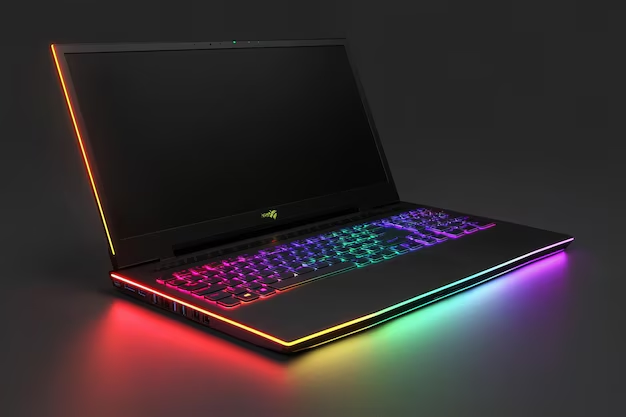
The Display Revolution: OLED vs. Mini-LED vs. IPS
Gaming Monitors built into laptops have seen rapid innovation. We are currently seeing a divergence in panel technology based on the user’s primary genre preference:
- High Refresh Rate IPS: For Competitive Gaming titles like Overwatch, League of Legends, or Dota 2, speed is everything. Laptops now feature 360Hz or even 480Hz panels. These screens prioritize motion clarity and low latency over perfect color accuracy.
- Mini-LED: This technology bridges the gap between brightness and contrast. It is ideal for HDR gaming in visually stunning titles, offering the brightness needed to make explosions in Action Games pop while maintaining deep blacks.
- OLED: The gold standard for contrast and response time. OLED panels are becoming increasingly common in 14-inch and 16-inch gaming laptops. They offer near-instant pixel response times, making them incredible for fast-paced Shooters and atmospheric Indie Games alike. However, burn-in remains a concern for static UI elements found in Strategy Games.
Thermal Management: Fighting Physics
Heat is the enemy of performance. As Gaming Tech advances, so do cooling solutions. Traditional heat pipes are being replaced or augmented by Vapor Chambers in high-end models. A vapor chamber covers a larger surface area, spreading heat more efficiently than copper pipes alone.
Furthermore, the application of Liquid Metal thermal compound (conductonaut) instead of traditional thermal paste has become a standard for brands like ASUS ROG and Alienware. This material has significantly higher thermal conductivity, allowing processors to run at higher clocks for longer periods. This is critical for sustaining performance during marathon sessions of Minecraft with heavy shaders or rendering complex scenes in Game Development software.
Real-World Scenario: Consider a gamer playing a demanding title like Red Dead Redemption 2. On a laptop with standard paste and fans, the system might hit 95°C and throttle down the GPU speed after 30 minutes, causing frame drops. A laptop equipped with a vapor chamber and liquid metal might stabilize at 85°C, maintaining maximum boost clocks indefinitely. This thermal headroom also impacts the longevity of the components.
Section 3: Software, OS Optimization, and the Linux Renaissance
Hardware is only half the equation. The software layer—specifically the Operating System (OS) and drivers—plays a pivotal role in how gaming laptops perform. Recent developments in kernel optimizations and OS updates have drastically changed the landscape.
Windows vs. The Rise of Linux Gaming
For years, Windows was the undisputed king of PC Gaming. However, the landscape is shifting. Thanks to the success of the Steam Deck and the efforts of Valve with Steam News consistently highlighting Proton updates, Linux has become a viable, and sometimes superior, option for gaming laptops.
Recent kernel updates in the Linux ecosystem have focused heavily on improved scheduling for hybrid CPU architectures and better power management for laptops. These updates often result in better battery life and more granular control over hardware security features compared to traditional setups. For enthusiasts interested in Retro Gaming and Game Emulation, Linux-based distributions often provide lower overhead, allowing emulators to run more efficiently.
Meanwhile, Windows 11 continues to refine its “Game Mode,” which prioritizes gaming processes and reduces background activity. The integration of DirectStorage APIs allows games to load assets directly to the GPU memory, bypassing CPU bottlenecks—a feature critical for next-gen AAA Games built on Unreal Engine 5.
Upscaling and Frame Generation
The most significant software advancement in recent years is AI-driven upscaling. NVIDIA’s DLSS (Deep Learning Super Sampling), AMD’s FSR (FidelityFX Super Resolution), and Intel’s XeSS allow laptops to render games at a lower resolution (saving power and heat) and upscale them to the native display resolution using AI.
Frame Generation technology takes this a step further by inserting AI-generated frames between rendered frames. For a laptop user, this is a game-changer. It allows a mid-range laptop to play demanding titles like Cyberpunk 2077 with Ray Tracing enabled at playable framerates. This software magic extends the lifespan of Gaming Laptops, ensuring they remain relevant for future Game Releases longer than previous generations.
Section 4: Peripherals, Ecosystem, and Practical Considerations
A gaming laptop is a self-contained ecosystem. The quality of the input devices and connectivity options can define the user experience just as much as the frame rate.
Input Devices: Keyboards and Audio
The mushy membrane keyboards of the past are disappearing from high-end models. Manufacturers are now integrating mechanical switches with tactile feedback directly into the chassis. Cherry MX low-profile switches provide the responsiveness required for FPS Games and MOBA Games like League of Legends. For the Gaming Community, the feel of the keystroke is paramount.
Similarly, audio has seen improvements, but serious gamers still rely on Gaming Headsets. However, the inclusion of spatial audio software (like Dolby Atmos or DTS:X) on laptops helps simulate surround sound, which is vital for positional cues in competitive shooters.
Connectivity and The Docking Lifestyle
Modern gaming laptops effectively serve as desktop replacements thanks to Thunderbolt 4 and USB 4 connectivity. These ports allow users to connect external Gaming Monitors, Gaming Keyboards, and Gaming Mice with a single cable. This versatility appeals to students and professionals who need a portable machine for work but want a full battlestation experience at home.
Furthermore, with the advent of Wi-Fi 7, wireless latency is becoming negligible, which is great news for Cloud Gaming services and wireless VR Gaming setups. Speaking of VR, powerful laptops are now the preferred engine for PC-VR enthusiasts who want to take their setup to different locations.
Battery Life: The Eternal Compromise
Despite software improvements, battery life remains the Achilles’ heel of x86 gaming laptops. While watching video or browsing might yield 6-8 hours, actual gaming on battery usually lasts 60 to 90 minutes. However, the rise of “handheld PC” gaming (influenced by Nintendo News and the Switch’s success) has pushed chipmakers to focus on low-wattage performance. We are seeing better performance-per-watt ratios, meaning you can play lighter Indie Games or Retro Gaming titles on battery for much longer than before.
Conclusion: The Future of Portable Gaming
The gaming laptop market is in a state of rapid evolution. We are moving away from the “bigger is better” mentality toward a focus on efficiency, AI integration, and display fidelity. With Gaming Industry giants pushing the boundaries of software optimization—from upscaling tech to kernel-level operating system improvements—the hardware is being utilized more effectively than ever before.
For the consumer, this means more choice. Whether you need a thin 14-inch machine for Game Design classes, a behemoth 18-inch replacement for your desktop to dominate in Call of Duty, or a Linux-optimized machine for tinkering with Game Mods and security testing, the options are vast. As we look toward future Game Releases, the gaming laptop stands ready not just as a compromise for mobility, but as a legitimate, high-performance platform that powers the global Gaming Community.
Key Takeaways:
- Always check the TGP (Total Graphics Power) of the GPU, not just the model name.
- Display choice (OLED vs. IPS) should depend on your primary gaming genre (Visuals vs. Competitive Speed).
- Software features like DLSS and Frame Generation are critical for longevity.
- Thermal engineering (Vapor Chambers, Liquid Metal) distinguishes premium laptops from budget ones.
- The gap between Windows and Linux for gaming is closing, offering more OS flexibility for power users.