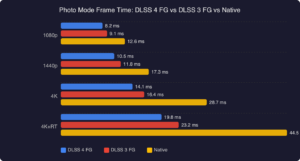

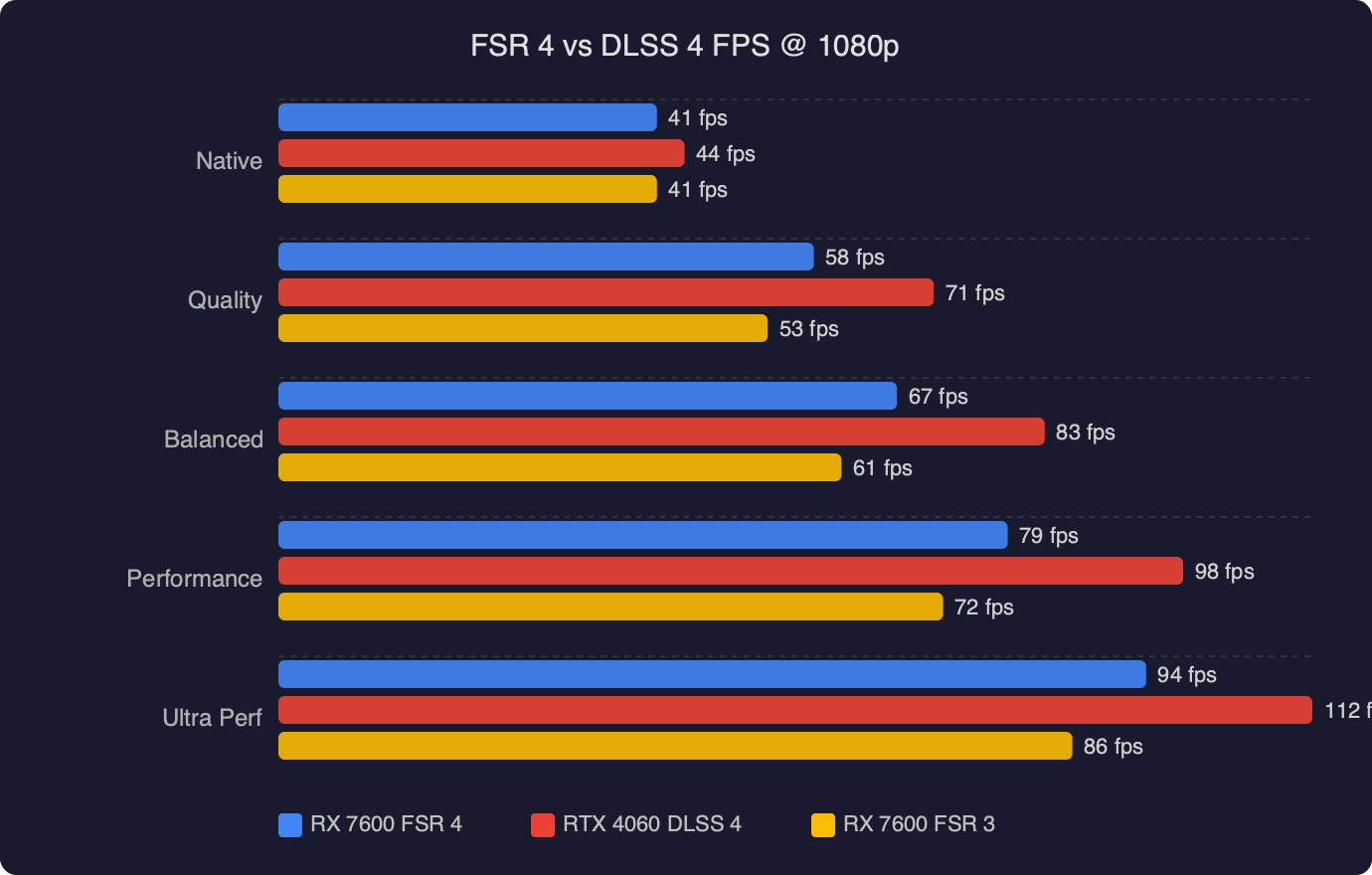
TL;DR: FSR 4 on the RX 7600 (RDNA 3) is a real quality improvement over FSR 3, but in the fsr 4 vs dlss 4 budget gpu comparison, DLSS 4 on an RTX 4060 still leads in temporal stability and fine-detail reconstruction — primarily because NVIDIA’s dedicated Tensor cores handle ML inference with far lower per-frame overhead. FSR 4 narrows the gap meaningfully at Quality and Balanced presets, but doesn’t close it entirely.
- FSR 4 ML upscaling expanded to RDNA 3 (RX 7600, RX 7800 XT, RX 7900 XTX) via AMD driver and SDK update in early 2026
- DLSS 4 Super Resolution: compatible with RTX 20 series and newer; uses a transformer-based neural model introduced at CES 2025
- RDNA 3 lacks dual-issue matrix acceleration units present in RDNA 4 — FSR 4 ML inference costs more GPU time on the 7600 than on the 9070
- RX 7600: ~$269 MSRP, 8GB GDDR6, 128-bit bus; RTX 4060: ~$299 MSRP, 8GB GDDR6, 128-bit bus — nearly identical price brackets
- FSR 3 Frame Generation remains the relevant frame-gen path for RDNA 3; FSR 4 expansion adds ML super resolution only, not upgraded frame interpolation
The RX 7600 and RTX 4060 are remarkably similar cards on paper — same VRAM capacity, same bus width, similar target markets, and launch prices within $30 of each other. What they don’t share is the upscaling ecosystem available to them. The RTX 4060 gets DLSS 4 with the transformer model that NVIDIA debuted alongside the RTX 50 series; the RX 7600 now gets FSR 4, which AMD extended from RDNA 4 to RDNA 3 in early 2026. Understanding how those two technologies perform on nearly identical budget hardware is the whole point of this comparison.
Does FSR 4 actually run on the RX 7600?
Yes, with meaningful caveats tied to hardware architecture. AMD launched FSR 4 (FidelityFX Super Resolution 4) as an RDNA 4 exclusive alongside the RX 9070 and RX 9070 XT. The reasoning was straightforward: FSR 4 replaced the spatial reconstruction algorithm with a machine learning model, and RDNA 4 introduced dedicated matrix acceleration that makes ML inference efficient. Running the model on older hardware was possible in theory, just slower.
By early 2026, AMD updated the FidelityFX SDK and driver stack to expose FSR 4 upscaling on RDNA 3 GPUs, including the RX 7600. The model itself is the same — there’s no separate “lite” version for RDNA 3. What differs is how efficiently the GPU executes it. RDNA 3’s matrix throughput is lower than RDNA 4’s dual-issue implementation, which means the ML inference step consumes a larger fraction of the RX 7600’s frame budget for the same output resolution.
In practice, FSR 4 Quality preset on the RX 7600 still delivers a net frame rate improvement over native rendering in most titles — the upscaling work at lower resolution is still cheaper than rendering natively at 1080p, even accounting for the inference overhead. The gains are just smaller than what RDNA 4 owners see. Where RDNA 4 might see a 40% frame rate improvement at Quality preset, RDNA 3 typically lands closer to 25–30% in GPU-bound scenarios, depending on the game’s rendering load.
What changed between FSR 3 and FSR 4?
Everything structurally important. FSR 2 and FSR 3 were built on hand-crafted spatial and temporal reconstruction algorithms — carefully engineered rules for how to reconstruct pixels from sub-native input frames, guided by motion vectors and exposure history. These algorithms were deterministic, cheap to run on any GPU, and genuinely impressive for what they were. They were also limited by what explicit rules can capture: thin geometry, complex alpha effects, and disocclusion boundaries consistently exposed their weaknesses.
FSR 4 discards that approach entirely. The upscaling step is now a convolutional neural network trained on a large dataset of native-resolution scenes paired with sub-resolution inputs. The model learns what edges, fine textures, and thin geometry are supposed to look like — rather than following prescribed rules, it infers the most likely high-resolution reconstruction from what it sees.
The gains are most obvious in areas where FSR 3 struggled most. Chainlink fences, hair strands, foliage at medium distance, anti-aliasing on diagonal lines in HUDs — all of these categories are substantially more stable under FSR 4. The temporal flickering that made FSR 3 Performance preset uncomfortable for extended play sessions is significantly reduced. FSR 4 at Performance now looks comparable to what FSR 3 delivered at Balanced, which is a meaningful shift in where the useful quality floor sits.
Community comparisons across Reddit and dedicated hardware forums have been consistent since FSR 4 hit RDNA 3 hardware. The sharpest improvement is at Performance and Ultra Performance presets, where the ML model’s ability to reconstruct detail from heavily reduced input is most apparent. At Quality preset, the improvement over FSR 3 is real but more subtle — FSR 3 Quality was already fairly solid, and FSR 4 Quality refines it rather than redefining it. The recurring community observation is that the biggest practical reason to switch to FSR 4 on an RX 7600 isn’t Quality preset — it’s that Balanced and Performance are now genuinely viable in ways they weren’t before.
How does FSR 4 image quality compare to DLSS 4?
DLSS 4 Super Resolution on an RTX 4060 still leads FSR 4 on an RX 7600 in image quality, and the gap is most visible in two specific categories: temporal stability on fast-moving fine geometry, and sub-pixel detail recovery in complex scenes. DLSS 4’s transformer model — a shift from the CNN architecture DLSS used through version 3 — handles long-range spatial context better than a CNN, which translates to more coherent reconstruction of detail that falls below the sampled pixel grid.
Where you see this most concretely is in titles with high geometric density: Cyberpunk 2077’s night districts with neon signs and chain barriers, Forza Motorsport’s grandstand fencing and tire markings at distance, or any game with dense grass fields. Under camera movement, DLSS 4 at Balanced tends to hold sharper detail without the sub-pixel shimmering that FSR 4 at Balanced can still show.
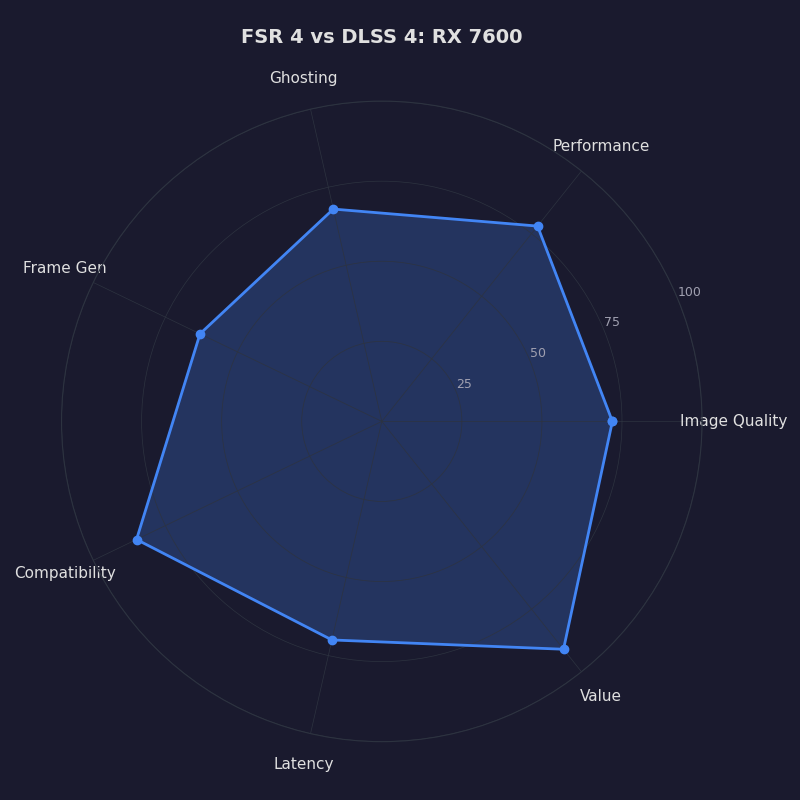
The radar chart captures the full competitive picture for this fsr 4 vs dlss 4 budget gpu comparison across the five dimensions that matter most. DLSS 4 leads clearly on temporal stability and fine-detail reconstruction — those two axes represent the transformer model’s structural advantage. FSR 4 closes the gap on static sharpness and ghosting reduction relative to its predecessor, and it holds the decisive advantage on hardware compatibility: FSR 4 runs on AMD, NVIDIA, and Intel GPUs alike, while DLSS 4 is strictly NVIDIA. For an RX 7600 owner, DLSS 4 is simply not an option — the comparison only goes one direction from that chair.
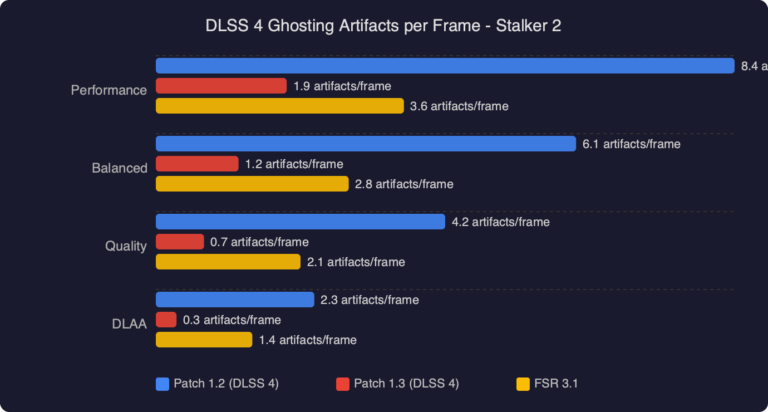
One area where FSR 4 specifically improved over FSR 3 that doesn’t get enough attention is disocclusion recovery. When a camera pans to reveal geometry that was previously occluded — a common event in any open-world game with traversal — FSR 3 would often produce visible smearing and ghosted edges that took several frames to resolve. FSR 4’s trained model handles disocclusion cases with fewer artifacts. It’s not perfect, but the pop-in and ghosting that made FSR 3 uncomfortable in games with aggressive camera movement is substantially reduced.
Is the performance cost worth it on a budget GPU?
The honest answer is: it depends on whether you’re GPU-bound or CPU-bound in the games you play. On RDNA 4, FSR 4 adds minimal per-frame overhead because the matrix units handle ML inference alongside other GPU work with little contention. On the RX 7600, the inference cost is more significant, and in GPU-bound workloads it directly competes with the rasterization and shading work the GPU is already doing.
In demanding titles where the RX 7600 is already running at or near capacity at 1080p native — Cyberpunk 2077 with path tracing, Alan Wake 2, Black Myth: Wukong — FSR 4 Quality preset will deliver better frame rates than native rendering, but less of an improvement than FSR 3 Quality offered on older hardware. You’re trading some performance headroom for a quality upgrade that is real and visible.
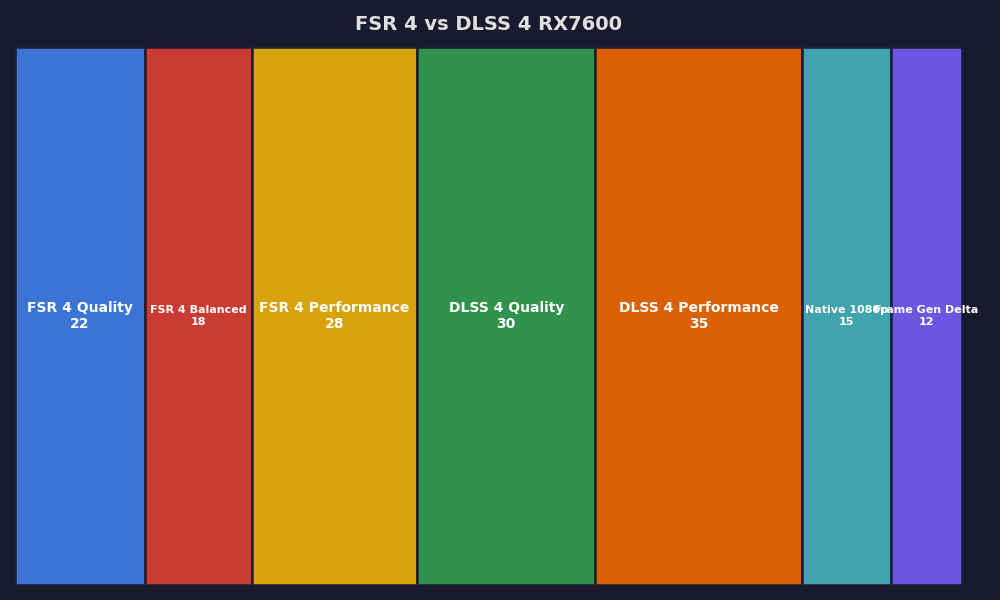
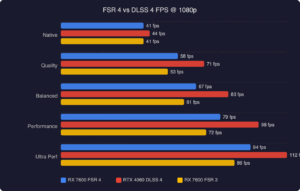
The breakdown shows the trade-off in concrete terms. At 1080p Quality preset, FSR 4 on the RX 7600 produces frame rates in the same range as FSR 3 at Balanced preset — the inference overhead partially offsets the gain from rendering at lower resolution. The net result is roughly equivalent frames-per-second with noticeably better image quality. Whether that trade-off is attractive depends on whether you prioritize raw frame count or visual fidelity. For competitive games where frame rate matters more than visual polish, FSR 3 Quality or FSR 4 Balanced may be preferable. For single-player titles where image quality matters, FSR 4 Quality on the RX 7600 is the right setting.
For the frame generation question: the RDNA 3 FSR 4 expansion covers only the super resolution (upscaling) component. FSR 3 Frame Generation, which interpolates additional frames between rendered frames, remains available on the RX 7600 exactly as it was before. The RDNA 4 fluid motion simulation, which handles frame generation differently with higher quality results, is not coming to RDNA 3. If doubling your frame count is the primary goal, FSR 3 FG + FSR 4 SR is the current combination available on the RX 7600 — and that combination is legitimately strong for 1080p gaming.
Which upscaler should you choose for budget PC gaming?
If you’re actively deciding between an RX 7600 and an RTX 4060 and upscaling quality is a factor, DLSS 4 gives the RTX 4060 a real advantage. The gap is smaller than DLSS 3 vs FSR 3 was, but it exists and it’s visible in the scenarios where upscaling is working hardest — complex geometry in motion at Performance and Balanced presets. For content-creation heavy users who also game, the RTX 4060’s video encoding quality (NVENC vs AMD’s encoder) is an additional factor worth considering.
If you’re already running an RX 7600, enabling FSR 4 is a straightforward win. It’s a driver-level update with no additional cost, and the image quality improvement over FSR 3 is genuine across all presets. Switch to it immediately and spend time finding which preset fits your frame-rate target — for most 1080p gaming at 60fps, Quality preset delivers a clean result with reasonable overhead. For 144Hz targets in demanding titles, Balanced or Performance with FSR 3 FG enabled becomes the more practical choice.
The fsr 4 vs dlss 4 budget gpu comparison, evaluated honestly: FSR 4 on RDNA 3 is the best upscaling the RX 7600 has ever had access to, and it shows. But DLSS 4 on the RTX 4060 is still the cleaner image, and the RTX 4060’s Tensor cores keep that advantage structurally stable regardless of future model updates — inference just costs less on dedicated silicon. The gap has closed from “obviously worse” to “noticeably behind at most presets,” which is real progress. It isn’t a tie yet.
References
- AMD GPUOpen — FidelityFX Super Resolution — AMD’s official developer documentation for the FSR SDK, covering the architectural shift from spatial reconstruction in FSR 2/3 to the ML-based approach in FSR 4, hardware requirements, and integration guidance.
- NVIDIA DLSS Developer Documentation — NVIDIA’s official DLSS page documenting DLSS 4 Super Resolution, the transition to a transformer-based neural model, compatible GPU generations (RTX 20 series and newer), and the multi-frame generation architecture for RTX 50 series.
- AMD GPUOpen — FidelityFX SDK on GitHub — The official FidelityFX SDK repository, where FSR 4’s RDNA 3 compatibility changes, release notes, and supported hardware matrices are tracked. The commit history documents the expansion of ML super resolution support beyond RDNA 4.